The Medicare open enrollment period just started, and it goes from October 15th through December 7th. During this period, you can choose a Prescription Drug Plan (PDP) that will begin on January 1st, 2016. Many people are confused because they don’t know how to shop around for a PDP. You don’t have to be an “expert” or a rocket scientist to purchase your own PDP. The purpose of this blog is to help you save money on your insurance premiums and find a PDP that is right for you.
IMPORTANT If you decide not to join a Medicare drug plan when you’re first eligible, and you don’t have other creditable prescription drug coverage, and you don’t get Extra Help, you’ll likely pay a late enrollment penalty if you join a plan later.
 Accessing the Medicare.gov Website

If you have access to a computer and the Internet, shopping around for a PDP is really quite easy. If you’re ready to begin, follow these steps:
1.) Navigate to the Medicare.gov website.
 2.) Under the blue tab at the top left-side of page that says Sign Up/Change Plans, click Find health & drug plans.
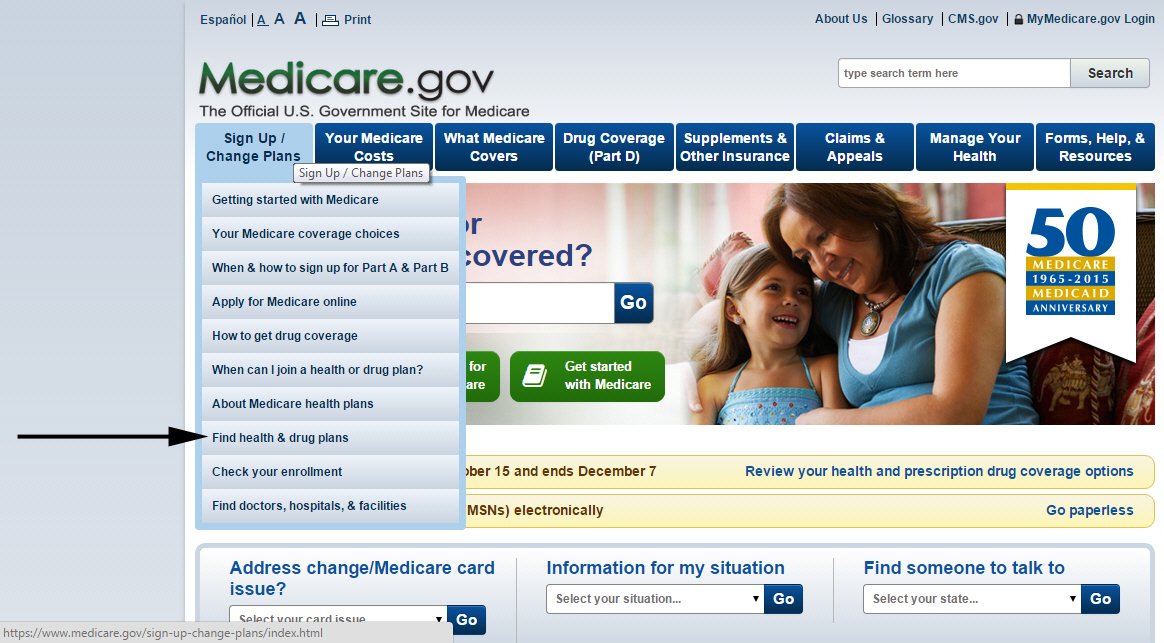 The Medicare Plan Finder page displays.
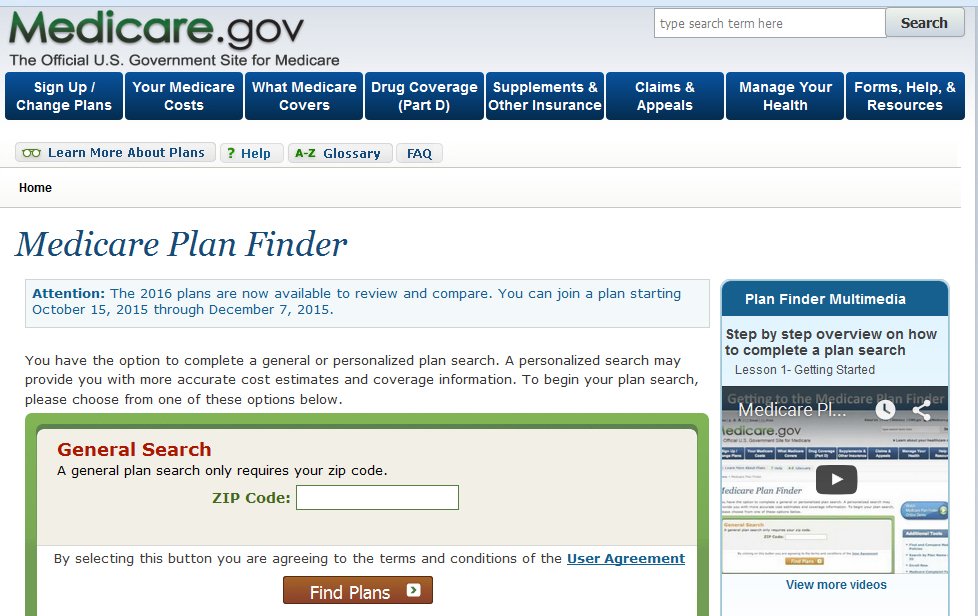 3.) In the General Search section, enter your zip code and click Find Plans. The Step 1 of 4 page displays.
NOTE If a survey window displays, close it and continue.
 4.) In the first section, select Original Medicare, and in the second section, select I don’t get any Extra Help. After that, click Continue to Plan Results. The Step 2 of 4 window displays.
NOTE You can choose other options that are more appropriate for your situation.
 5.) Enter your prescriptions in the text box and choose the appropriate dosages for each. A window, similar to the following, displays.
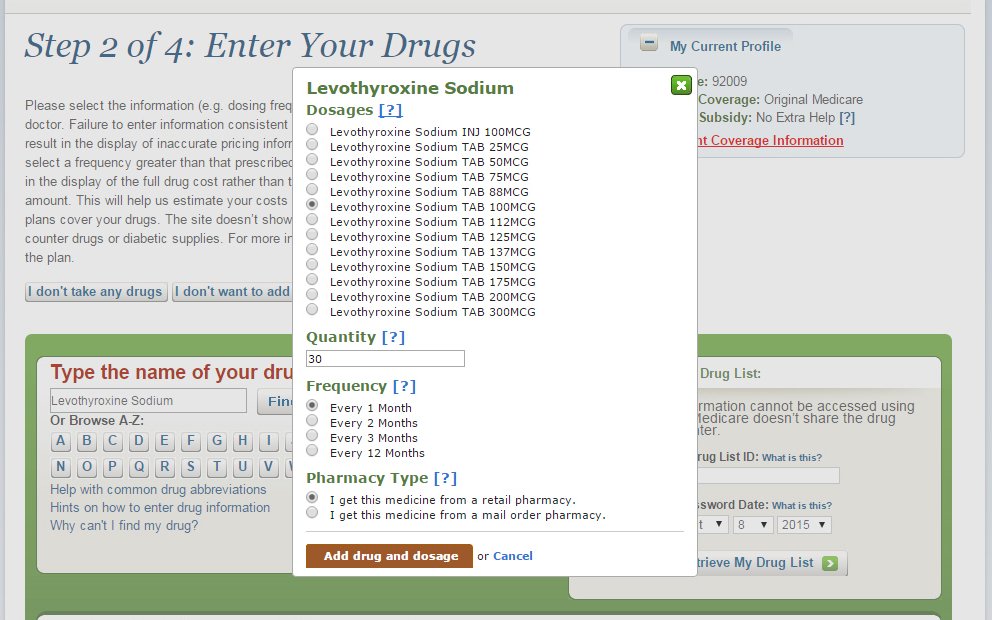 6.) After you select the appropriate prescription dose, click Add drug and dosage.
NOTE: Continue adding your prescriptions until your prescription drug list is complete. You can add up to 25 prescriptions, and you can see your list in the lower part of the window. You can also choose “mail order pharmacy” to have your prescriptions mailed to you. In some instances, it is more cost effective to do that. If you select “mail order pharmacy,” information for both retail pharmacies and mail order options will display.
7.) Write down the Drug List ID number AND the Password Date on a separate piece of paper.
NOTE The prescriptions, dosages, etc. that you entered are saved, and you can enter this number and the date later on to retrieve your prescription information instead of reentering it again.
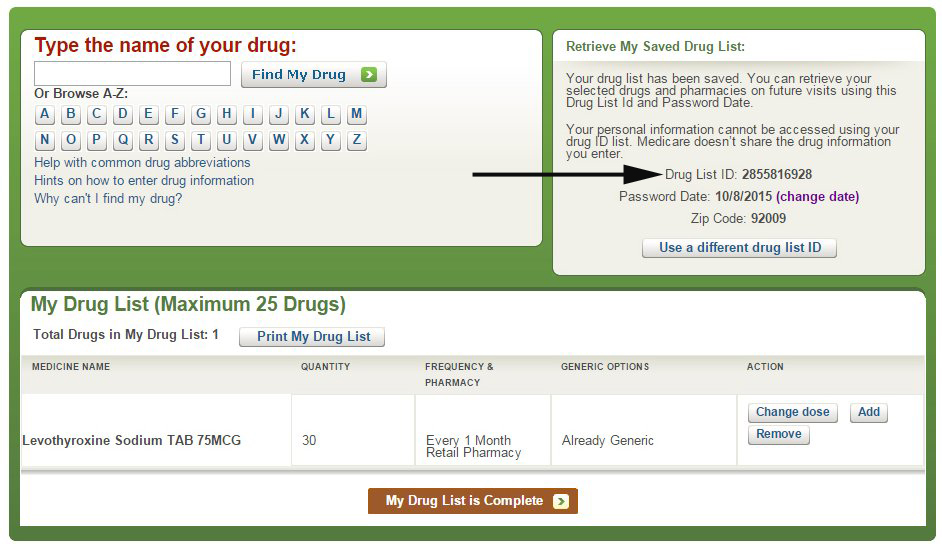 8.) Click My Drug List is Complete when your drug list is complete. The Step 3 of 4 window displays.
 9.) Click Add Pharmacy to add up to two pharmacies, and then click Continue to Plan Results. The Step 4 of 4 window displays.
NOTE You can click the drop-down menu at the top of the page to select from more pharmacies near your zip code.
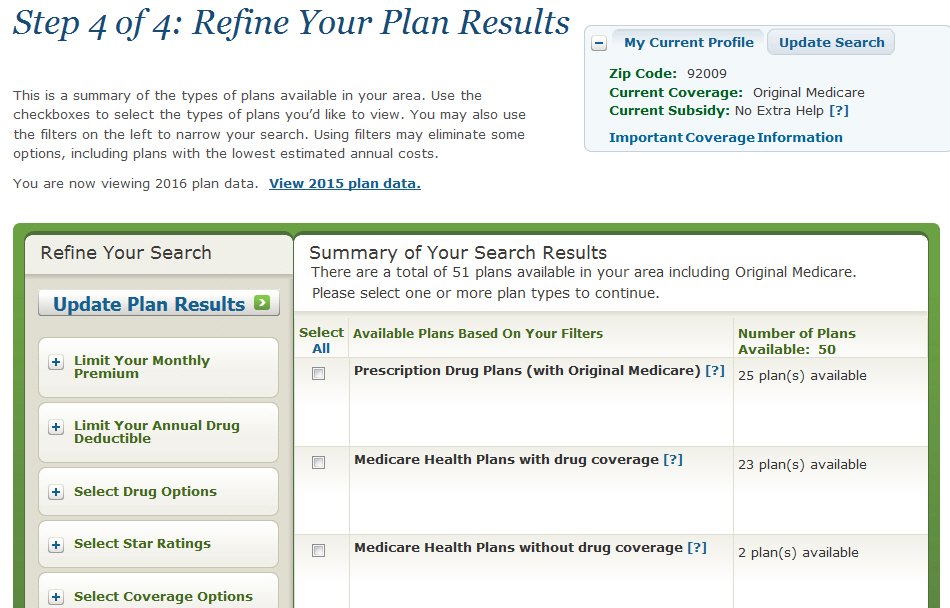 10.) Click the check box next to Prescription Drug Plans (with Original Medicare), and then click Continue to Plan Results. The Your Plan Results window displays.
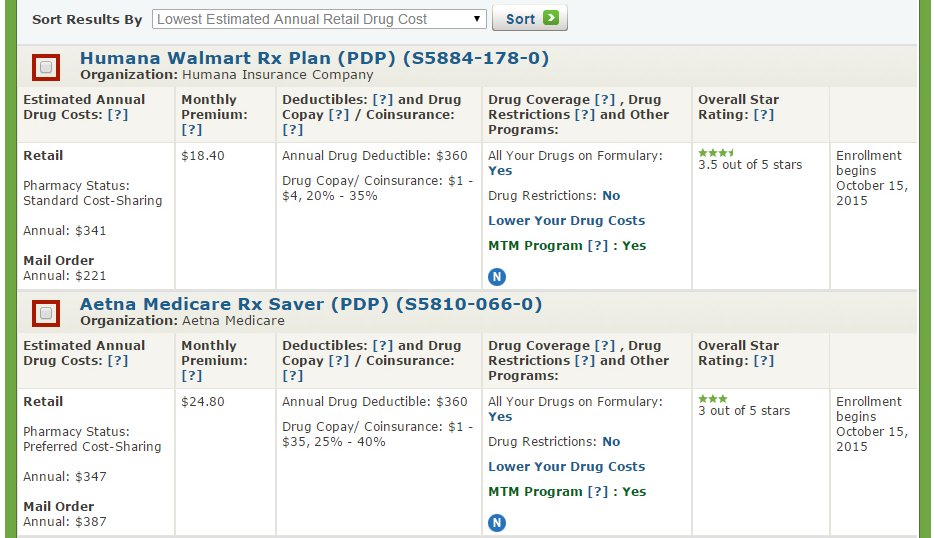 NOTE By default, the prescription drug plans are sorted from the lowest to highest estimated annual retail drug cost. In the Plan Results window, click View All to see all the plans.
Understanding the Plan Results Window
After you access the Plan Results window, you are ready to evaluate and compare prescription drug plans and decide which plan is best for you.
There are different variables to take into consideration when choosing a PDP. Here are some of the more important ones:
- Are drugs on the formulary?
- Drug restrictions
- Estimated annual drug costs
- Annual drug deductible
- Monthly premium
- Overall star rating of the company
Are Drugs on the Formulary?
If a drug is not on the PDP formulary, that means that the plan does not offer coverage for that specific drug, and you should continue looking at other plans.
Drug Restrictions
If there are drug restrictions, the plan may have certain coverage restrictions (including quantity limits, prior authorization, etc.) on a prescription drug. Although your prescription may have limitations, these limits may not necessarily adversely affect you, and the plan may still meet your needs. For example, if you take 30 pills a month and the plan will cover a maximum of 60 per month, that would not impact you, and the plan is still worth considering.
Estimated Annual Costs
This is an estimate of the average amount you might expect to pay each year for your prescription drug coverage. This estimate includes the following costs:
- Monthly premiums
- Annual deductible
- Drug copayments/coinsurance
- Drug costs not covered by prescription drug insurance
If you entered your drugs into the Medicare Plan Finder, then this estimate includes the cost of those drugs.
IMPORTANT If your prescriptions are covered by the plan’s formulary and there are no major drug restrictions on the plan, this is the critical piece of information you need to determine which plan you select because it factors in all your premiums, deductibles, co-payments, and miscellaneous drug costs for the entire year. I don’t really factor in the various co-payments of each prescription; the estimated annual costs tell you approximately how much you will spend during the entire year.
Compare the estimated total annual pharmacy and mail order costs between the different plans to determine which plan offers you the best deal for the entire year!
 NOTE In the previous example, the total retail annual costs for Humana are approximately $341 compared to $221 for the mail order costs. For Aetna, the total retail costs are approximately $347 compared to $387 for the mail order costs. Therefore, in this example, the most cost-effective option is to purchase the Humana PDP and use their mail order service.
If you selected “I don’t take any drugs,” then this amount includes only the cost of the monthly premiums that you would pay for the plan and it does not include any drug costs. If you selected “I don’t want to add drugs now,” then this estimate includes the average drug costs for people with Medicare and may differ depending on your age and health status.
Annual Drug Deductible
Some plans have no annual deductible and others have a maximum annual deductible up to $360 per year. Again, use the estimated annual costs to determine the value of the plan, not just the deductibles, the co-payments, etc.
Monthly Premium
The lowest monthly premium (and deductible) does not necessarily mean that you will be saving the most money. Again, compare the estimated annual drug cost to determine which plan is the most cost effective.
Overall Star Rating of the Company
For plans covering drug services, the overall score for quality of those services covers many different topics that fall into four categories:
- Drug plan customer service: Includes how well the plan handles member appeals.
- Member complaints and changes in the drug plan’s performance: Includes how often Medicare found problems with the plan and how often members had problems with the plan. Includes how much the plan’s performance has improved (if at all) over time.
- Member experience with plan’s drug services: Includes ratings of member satisfaction with the plan.
- Drug safety and accuracy of drug pricing: Includes how accurate the plan’s pricing information is and how often members with certain medical conditions are prescribed drugs in a way that is safer and clinically recommended for their condition.
If the plan has a low star rating, I would not recommend signing up for it.
Drilling Down a Little Deeper on the Medicare.gov Website
To get more information about a specific plan, click on the name of the plan, which is a hypertext link. In the following example, click Humana Walmart Rx Plan (PDP).
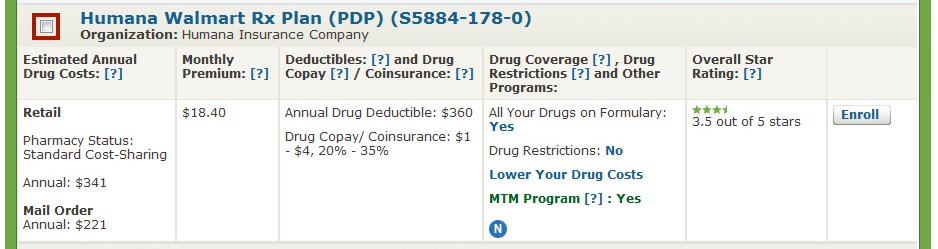
After you click the name of the plan, a window, similar to the following, displays.
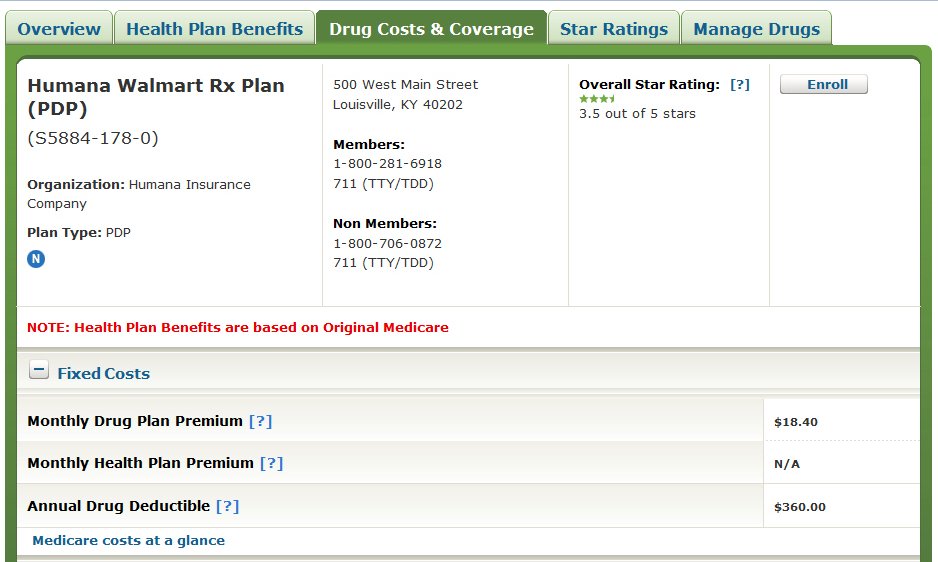
The previous window shows the phone numbers, for members and non-members.
NOTE If you have questions about the plan or wish to enroll, you would call the phone number for non-members. For more information, see “Signing Up for a PDP Plan” below.
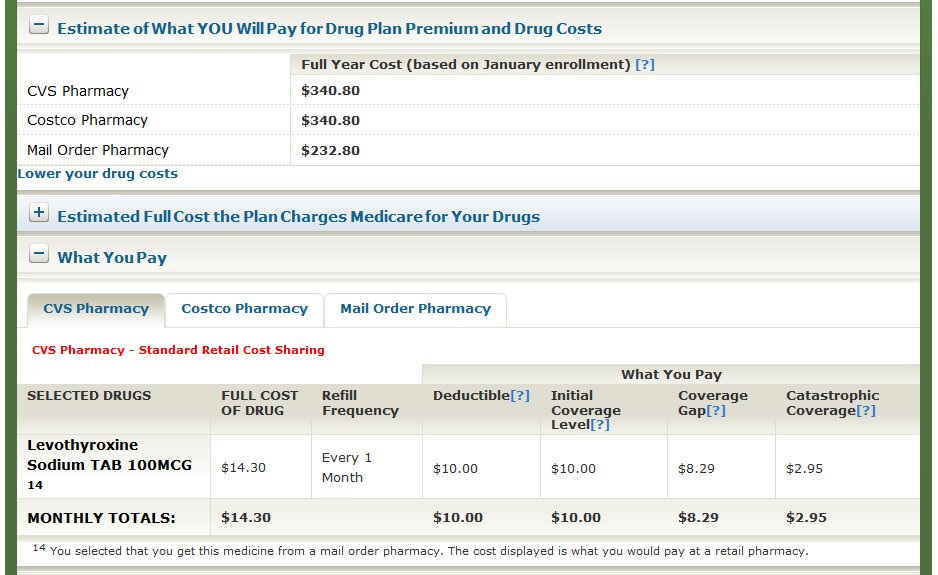
The previous window shows the estimated monthly totals for prescriptions at CVS Pharmacy.

The previous window shows the estimated monthly cost (premium and deductible) for prescriptions at CVS Pharmacy.
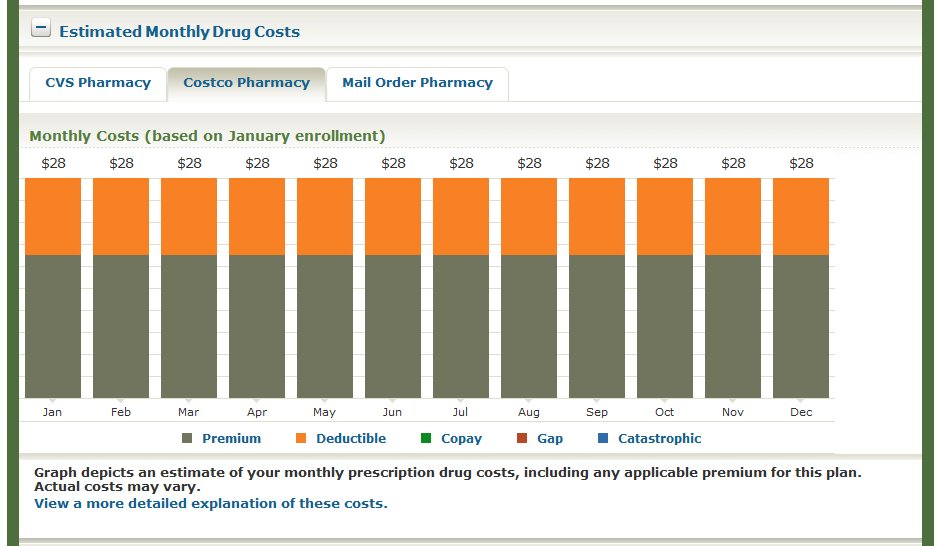
The previous window shows the estimated monthly cost (premium and deductible) for prescriptions at Costco Pharmacy.
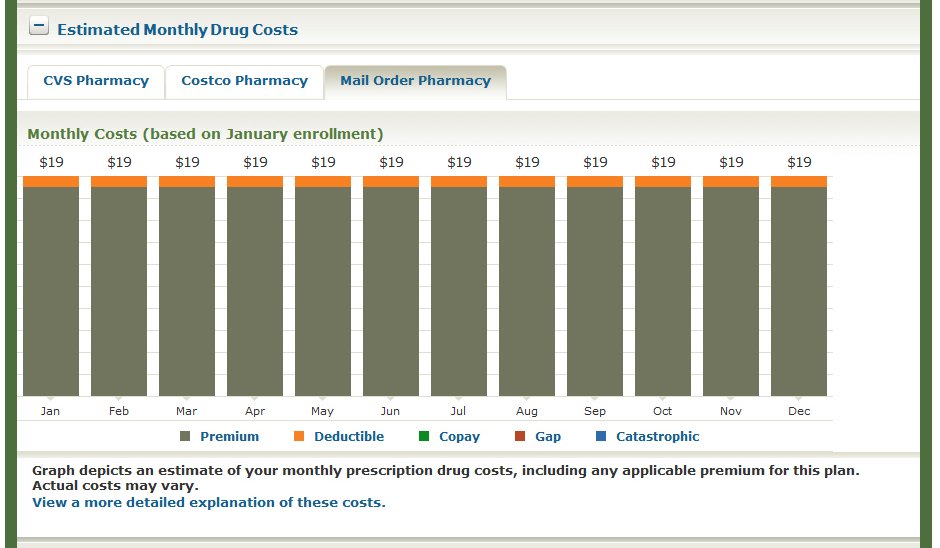
The previous window shows the estimated monthly cost (premium and deductible) for prescriptions through a mail order pharmacy.

The previous window shows drug coverage information, such as formulary status and Tier information, for the various prescriptions you entered on the Medicare.gov website.
Signing Up for a PDP Plan
After you have evaluated and compared several prescription drug plans, you are ready to sign up for a PDP on your own.
Follow these steps to sign up for a prescription drug plan:
1.) From the Your Plan Details window, click on the hypertext name of the plan you are interested in. In the following example, click Humana Walmart Rx Plan (PDP).
After you click the name of the plan you are interested in, a window, similar to the following, displays.
2.) Call the toll-free number for non-members, and speak to a representative of the company.
IMPORTANT If you have questions about the plan or wish to enroll, you would call the phone number for non-members. When you decide to enroll, call the plan and verify that your prescriptions are covered by the plan and that the estimated annual retail pharmacy or mail order drug costs are accurate. You want to make sure that you are interpreting and understanding the information correctly from the Medicare.gov website.
Conclusion
After you go to the Medicare.gov website and play around with it a little, you will find that signing up for a prescription drug plan is really quite easy.
NOTE If you are having trouble signing up for a prescription drug plan or if you ever have Medicare questions or need help understanding information on the Medicare.gov website, call 1-800-MEDICARE. They are open 24 x 7, and most of the representatives are very helpful.
My primary specialty is Medicare Supplement insurance, but if you have any questions or comments, please feel free to contact me at RonLewisInsurance@yahoo.com.
 Medigap Shopper News
This was a very helpful blog post. Thanks for writing it. Question: Are Medicare D plans guaranteed issue during the open enrollment period each year? Or can they be subject to medical underwriting?
I’m sorry for not responding to your question sooner. I’ve been a little side-tracked, and I just saw your question now. Thank you for your comment! I’m glad that you found the post to be helpful.
Yes, prescription drug plans (Part D) and Medicare Advantage plans (Part C) are both guaranteed issue during the annual enrollment period (AEP), which goes from October 15th through December 7th each year (for a January 1st effective date). There are other special enrollment periods (SEPs) where these benefits would also be guaranteed, such as if your employer stopped offering benefits, etc.
During the open enrollment periods, there is no medical underwriting as these products are a “guaranteed issue” during that time.
Thanks again!
Ron